Video Generation with Veo 3.1: A Reviewable Workflow
Recorded fictional Veo 3.1 examples for short video briefs, with current availability and credits supplied by the product before submission.
Fictional example library: Prism, NovaCraft, Wavelength, and every product, company, scene, and result below are invented teaching material. They are not customers, paid productions, cost comparisons, or evidence of campaign performance.
ImageLayer accepts asynchronous video requests from an admitted authenticated workspace. Public video options are Veo 3.1 Fast and Veo 3.1 Quality via Vertex AI. Completion time varies with queue, duration, resolution, and provider availability.
This guide records six fictional prompt-and-output examples. The displayed clips document individual runs; repeating a prompt can produce a different result.
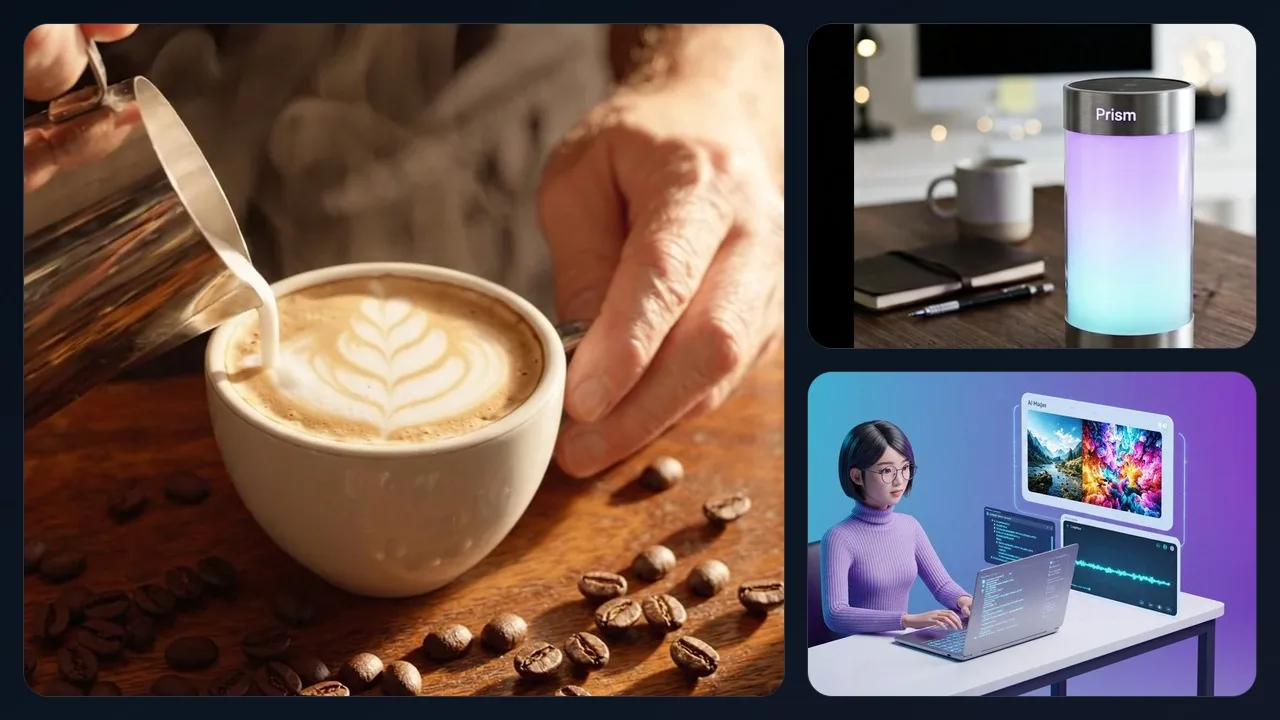
Recorded synthetic examples: a coffee teaser, product concept, and explainer clip.
Video content type templates
Built-in video templates surface fields aligned with how teams brief video—so you are not starting from a blank box:
- Product Demo — Showcase hardware or software with camera movement, materials, and environment.
- Social Teaser — Fast-paced cuts, mood, and platform-friendly pacing.
- Brand Intro — Logo reveals, typography, and motion graphics language.
- Explainer Clip — Clear visual storytelling for concepts or flows.
- Announcement — Launch and news-style framing.
- Atmosphere / Scene — Mood, setting, and ambient storytelling without heavy product focus.
Each template collects subject, setting, tone, and motion fields differently. It does not guarantee fewer iterations.
Step-by-step: Product demo video
Here is a full run-through for a product demo clip using Veo 3.1 Fast.
-
Set Output mode to Video.
-
Choose Model: Veo 3.1 Fast.
-
Upload an authorized product still as a source image to guide shape, materials, and environment; keep the source as the record of truth.
-
Use this prompt (verbatim):
“Create a realistic cinematic product video of the exact smart lamp shown in the source image. Keep the same cylindrical brushed aluminum body, frosted glowing core, proportions, and premium finish. The lamp stays physically stable on a clean dark walnut desk in a minimalist home office. The camera performs a slow subtle three-quarter dolly arc with a gentle push-in, no full spinning turntable, no wobble, no shape changes. Ambient glow transitions naturally between warm amber, soft violet, and cool teal. Professional studio lighting, shallow depth of field, realistic reflections, tasteful premium tech aesthetic.”
-
Set Duration to 8 seconds.
-
Set Resolution to 720p.
Generated result: Prism smart lamp product demo — 8 seconds, 720p
The selector shows the exact pre-submit quote for this configuration. Completion time is not guaranteed and varies with queue and provider conditions. Merged-video voiceover is not part of the current production launch path; use standalone Audio only where the workspace enables it.
Step-by-step: Social media teaser
Same Video mode and Veo 3.1 Fast. When the hero shot needs realistic motion — hands, pouring, physics — text-to-video lets the model decide the physics frame-by-frame. Prompt:
“Cinematic artisanal coffee brand teaser for NovaCraft. A barista hand tilts a steel milk pitcher and pours steamed milk into a wide ceramic cappuccino cup, creating a leaf latte art pattern on the surface. The camera starts overhead looking straight down and slowly glides to a three-quarter angle as the pour finishes. Roasted coffee beans are scattered on the warm wooden counter beside the cup. Warm golden morning light from a window, rich brown and cream palette, shallow depth of field, realistic steam, appetizing café atmosphere. Shot on a professional cinema camera. No beans falling into the drink.”
The recorded run used 8s and 720p. Check the current selector for model availability and the exact quote. Review hands, liquid motion, ingredients, and the depicted product before use.
Generated result: NovaCraft coffee social teaser — 8 seconds, 720p
Step-by-step: Brand intro animation
Video + Veo 3.1 Fast. Specify typography, palette, and how elements assemble. Prompt:
“Elegant logo reveal animation for Wavelength podcast brand. The word Wavelength materializes from flowing audio waveform particles that pulse and converge. Deep navy background with electric blue and soft purple gradient accents. Sound wave visualization ripples outward as letters form. Clean modern sans-serif typography. Premium motion graphics quality with smooth particle physics.”
The recorded run used 6s and 720p. Check the current selector for the exact quote before submitting a new request.
Generated result: Wavelength podcast brand intro — 6 seconds, 720p
More examples: Explainer, Atmosphere, Product
Three more templates in action — each with the exact prompt we used.
Explainer Clip
A fictional developer-workflow explainer in isometric 3D. The recorded run used 8 seconds and 720p.
Polished 3D product explainer for an AI media generation widget. A woman developer sits at a desk working on a laptop with a visible code editor. To the right of the laptop, a floating preview panel appears clearly separated from the screen and shows AI-generated images appearing in sequence. Then two additional floating cards appear one after another: a short video preview card and an audio waveform card. Keep all floating UI cards clearly separated from the laptop, with clean spacing and no overlapping or merging objects. Soft purple-to-teal gradient background, modern tech aesthetic, smooth motion graphics, premium startup product video, isometric 3D style.
Generated result: Widget explainer — 8 seconds, 720p
Atmosphere / Scene
A mood-first establishing shot with no product focus. The recorded run used 8 seconds and 720p.
Cozy coffee shop interior establishing shot. Camera slowly drifts through a warm cafe with exposed brick walls and hanging Edison bulbs. Morning sunlight streams through tall windows. Steam rises from cups. Slow dreamy camera movement. Cinematic shallow depth of field. Warm amber color grading.
Generated result: Coffee shop atmosphere — 8 seconds, 720p
Product Demo (Alternate)
Same template, different fictional product. The recorded run used 8 seconds and 720p.
A cinematic product showcase of a minimalist titanium watch with matte black dial and mesh strap. The camera smoothly orbits to reveal the watch face catching light reflections. Shot against a slate gray surface. Professional studio lighting, shallow depth of field. Light glints off the sapphire crystal. Premium luxury aesthetic, 4K quality.
Generated result: Titanium watch showcase — 8 seconds, 720p
Pro tips for better videos
Write like a director, not a tagline. Name the camera behavior: orbit, dolly, push-in, handheld, aerial. State subject, environment, and what should stay sharp in frame.
Describe light and lens intent. Phrases like “soft key light,” “rim light,” “golden hour,” “shallow depth of field,” and “clean background” give the model more visual direction.
Describe the palette. Name colors directly rather than promising that the generated grade will stay consistent with a brand system.
Duration: For product and social clips, 6–8 seconds is a practical sweet spot: long enough for a micro-narrative, short enough to iterate quickly. Go shorter for logo stingers; extend only when the brief truly needs more beats.
Iterate on one axis at a time. If motion feels wrong, adjust camera and pacing before you rewrite the entire scene description.
Pricing
Video is configured for paid workspaces, with 1080p controlled by the current plan. The authenticated selector is the source of truth for model access, supported duration and resolution, and the exact pre-submit quote. Availability can also depend on region, provider eligibility, and current lifecycle admission.
Confirm monthly credits in the dashboard before batch runs—whether you are testing solo or serving users via the widget.
Keep exploring
- Fictional Skincare Video Workflow: Comparing Brand Context Safely — A review-first comparison of requests with and without saved context.
- Fictional B2B Video Workflow: Brand Context and Review Boundaries — A constrained B2B prompt and its review boundaries.
- Video Voiceovers in ImageLayer: Current Launch Status — Why merged voiceover is currently fail-closed and how to keep standalone audio separate.
- From Zero to Product Launch: Creating a Complete Demo Package with AI — Full Prism launch kit with prompts and credits.
Next steps
The public playground previews the interface without submitting anonymous production video. Authenticated generation runs only when workspace entitlement and billing controls admit it. For embedding, auth, and API details, see documentation.
Match the template to the use case, keep camera, light, and color explicit, and treat every output as a draft that needs technical and editorial review.