Fictional Showcase: A Multimodal Launch Kit for Prism
A fictional smart-lamp workflow illustrating video, image, standalone TTS, and text generation in ImageLayer; it is not customer work or a performance case study.
Fictional example: Prism is an invented product used to demonstrate workflow structure. Nothing in this article is customer proof, a testimonial, or evidence of business results. Credit quotes and model availability must be confirmed in the widget for each new request.
Launching a hardware concept can involve several separately reviewed deliverables: a motion draft, product imagery, standalone narration, and copy. This fictional walkthrough does not compare ImageLayer with a production budget or promise a delivery timeline.
The recorded Prism assets below illustrate how those request types can be configured from one ImageLayer surface. They are not evidence that a new request will reproduce the same output. Availability, quote, completion time, and result depend on the live workspace and provider conditions.
The product: Prism
Prism is a fictional smart ambient desk lamp: a cylindrical form in brushed aluminum, with a color-shifting LED core that moves between warm amber, soft violet, and cool teal depending on mood and scene. The aesthetic is premium and restrained—something that could sit on a dark walnut desk in a modern home office without shouting for attention.
Demo video
For the recorded Video request, we supplied the product still as a source image to steer the requested lamp silhouette, materials, and desk setup. A source image is conditioning input, not a fidelity guarantee; review the complete clip for shape, material, and scene drift.
Recorded settings: 8 seconds and 720p. For a new request, select only a Veo model currently admitted by the signed-in widget and confirm its pre-submit quote.
Prompt (verbatim, paired with the product still as the source image):
“Create a realistic cinematic product video of the exact smart lamp shown in the source image. Keep the same cylindrical brushed aluminum body, frosted glowing core, proportions, and premium finish. The lamp stays physically stable on a clean dark walnut desk in a minimalist home office. The camera performs a slow subtle three-quarter dolly arc with a gentle push-in, no full spinning turntable, no wobble, no shape changes. Ambient glow transitions naturally between warm amber, soft violet, and cool teal. Professional studio lighting, shallow depth of field, realistic reflections, tasteful premium tech aesthetic.”
This recorded run used image-to-video rather than raw text-to-video. The still and prompt supplied identity, camera, material, and set constraints for the model; they did not lock those properties. Inspect every frame before treating the clip as faithful to the reference.
Recorded fictional showcase result: Prism product demo — 8 seconds, 720p. This asset does not establish a current request price or repeatability claim.
Product photography
For stills that could anchor a PDP, email hero, or paid social static, we switched to Image mode and biased toward catalog-style clarity.
Recorded setting: 1:1 aspect ratio. Confirm the current image model and pre-submit quote for a new request.
Prompt (verbatim):
“Product photography of a sleek cylindrical smart lamp called Prism with brushed aluminum finish, glowing with a soft purple-teal gradient ambient light. Set on a dark walnut desk in a minimalist home office. Shallow depth of field, studio lighting from the left. Premium tech product aesthetic.”
The prompt repeats the desk and lamp constraints used in the video brief. Review the resulting image at its intended display sizes; the shared wording does not guarantee cross-model consistency or a particular level of sharpness.
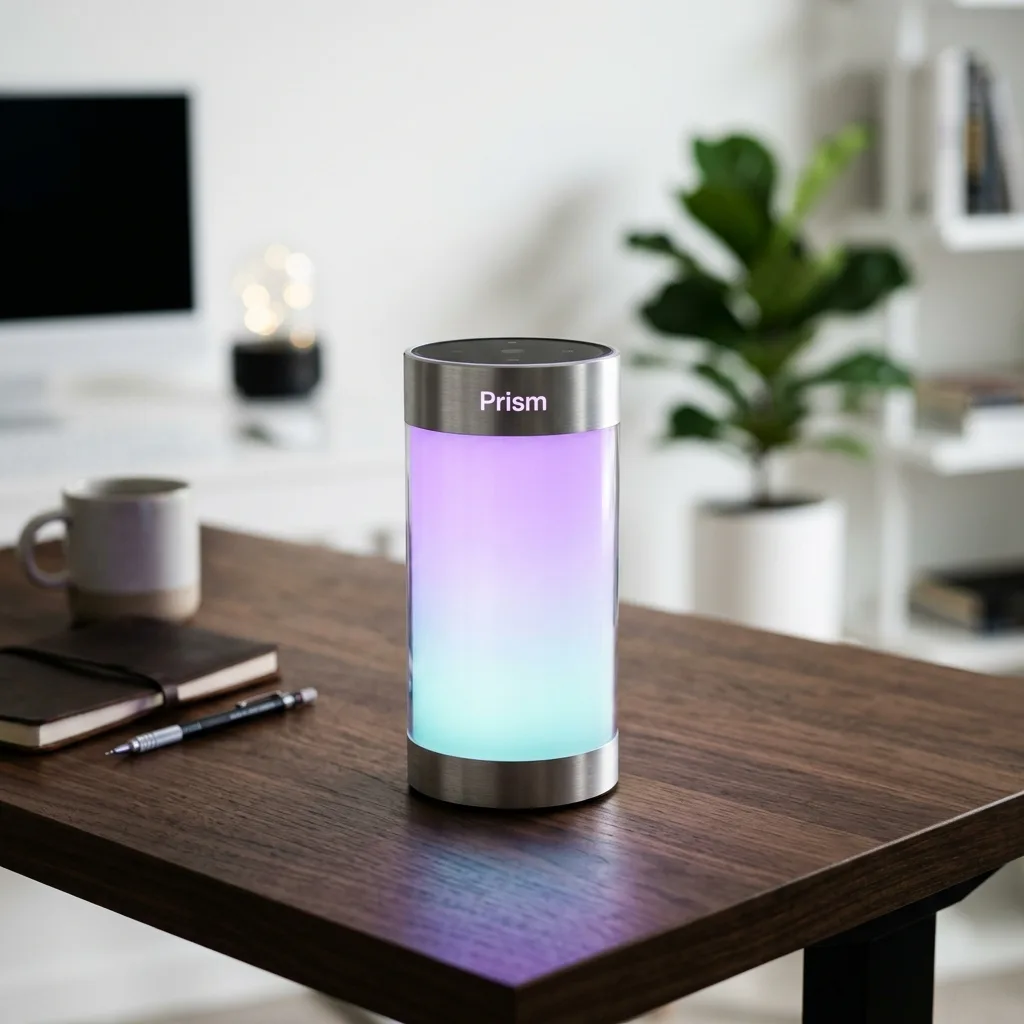
Recorded fictional showcase result: Prism product shot — 1:1 aspect ratio. Use the live quote for a new request.
Voiceover
For the standalone narration draft, choose Gemini TTS Flash with Kore, a Google voice labeled Firm in the current selector.
The request quote is calculated from the selected model, requested duration, and exact script. Review the quote shown by the widget instead of reusing a fixed credit or duration claim from this article.
Fiction-safe prompt:
“Prism is a fictional smart-lamp concept created for this ImageLayer tutorial. This sample narration describes its brushed-aluminum form and adjustable ambient light. It does not describe a real product, customer, or measured result.”
The script keeps the product disclosure inside the narration brief and avoids unsupported claims about mood, quality, or real-world performance.
No narration file is embedded here. The former sample was removed because its spoken claims and provenance were not suitable for public launch evidence. A replacement should be published only after complete playback, transcript, duration, model, voice, and file-hash review.
Product copy
Finally, we used Text mode for long-form marketing language suitable for a landing page or press kit blurb.
There is no reusable text-generation price in this walkthrough. Review the model and quote shown for the exact request before submitting.
Prompt (verbatim):
“Write a premium product description for Prism — a smart ambient desk lamp…”
This keeps the brief constraint-heavy—materials, palette, audience, and structure—so reviewers have explicit criteria. The resulting copy still requires factual, legal, and brand review.
Request quotes
| Asset | Mode | Pricing source |
|---|---|---|
| Demo video | Video | Live pre-submit quote |
| Product photo | Image | Live pre-submit quote |
| Standalone narration | Audio | Live pre-submit quote |
| Product copy | Text | Live pre-submit quote |
The package total depends on the current quote for every request, including the exact audio script and requested duration. Confirm the displayed total before submitting; this fictional walkthrough is not a billing record.
Keep exploring
- Fictional Video Brand-Context Review for Solene — A review workflow for generic and context-guided drafts.
- Video Generation Guide: Current Veo Workflow — Current models, controls, request quotes, and review steps.
- Text-to-Speech in ImageLayer: Current Models, Voices, and Quotes — Public TTS models, compatible voices, and request quoting.
- Fictional NovaCraft Multimodal Workflow — A clearly labeled concept across image, video, standalone audio, and text.
Inspect the launch-kit flow
Inspect the video, image, standalone audio, and text configuration flow in the ImageLayer playground. The public preview uses sample data and does not call a generation provider. For an actual request, sign in to an eligible workspace and rely on its live admission, quote, credits, spend controls, and provider checks.